
-

Nathan posted an update
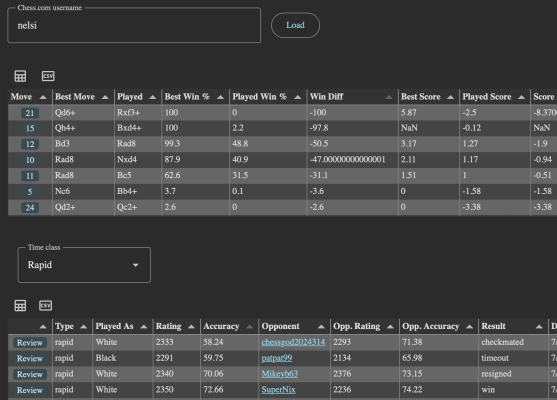
After watching Nelson’s video where he used excel to analyze his chess games, I wanted to come up with a faster way. https://chessalyzer.web.app/ will download your last two months of games and let you filter and sort them. Then you can click “Review” to run stockfish in browser to analyze each move. I like to sort the review by “Win Diff” to find the biggest gap and then open the analysis board to see the move on chess.com.
It’s a work in progress, so if there’s anything that would be really helpful, let me know.
 Dejvid T, Dominic and 4 others4 Comments
-

Thanks, it’s really helpful!
Where do you go to change the filter’s columns name as per I see on your posted image Win Diff? -

Right now the only filter is on the time class of the games. Everything else is just sortable by clicking on the column heading.
-

It not working for me am I doing something wrong
-
I noticed my tablet and phone don’t seem to like the stockfish library. I have to use my laptop.
-
-